Back to blog
Your Figma plugin shouldn't need a new review to change.
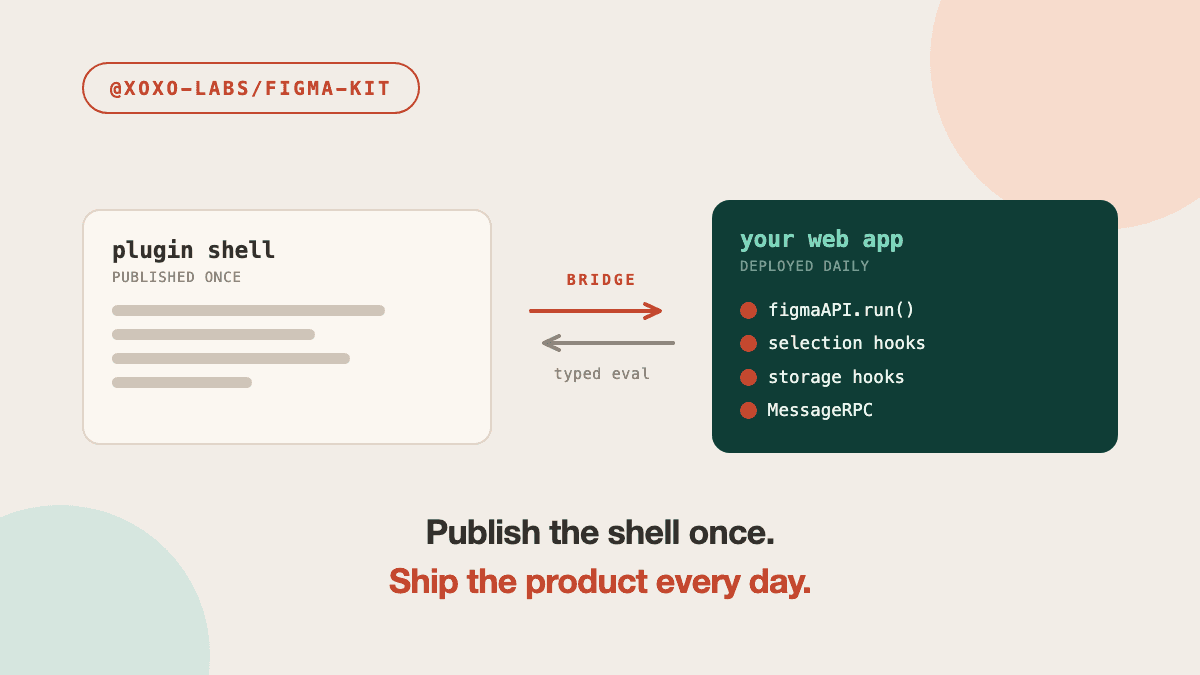
The slowest part of building a Figma plugin is not writing it. It is shipping a change to it.
A copy fix, a new option, a smarter default—each one means a new bundle, a new version, and a wait while the change makes its way through review before anyone can use it. The work takes minutes. The delivery takes days.
The way out of that loop is not our idea. Figma publishes it themselves, in figma/ai-plugin-template: a Next.js app that is the plugin UI, plus a tiny published shell that runs code on its behalf. We adopted that pattern for our own plugin instead of inventing one, and then packaged it—typed, with a React layer around it—as @xoxo-labs/figma-kit.
Two halves that cannot see each other
A Figma plugin runs in two places at once.
The sandbox has the figma API—nodes, pages, variables, selection—and almost nothing else. No DOM, no fetch, no npm ecosystem worth speaking of.
The UI is an iframe. It has the DOM and the network, and no access to figma at all. The two halves talk over postMessage.
The usual approach bundles both halves and publishes them together. That is why every change, however small, becomes a release: your product logic is sitting inside the artifact that needs approval.
Freeze the shell, host the rest
figma.showUI accepts HTML that can point the iframe anywhere—including at a web app you deploy yourself. Once the iframe loads your own site, the published plugin no longer has to contain your product. It only has to contain the bridge.
Figma's template does this in about forty lines: plugin/code.ts redirects the iframe with a one-line <script>, then listens for EVAL messages, evals the code they carry, and posts the result back. That file is the mechanism, and it is worth reading once—everything below is that idea, given types and a package boundary.
Here is the entire sandbox side of a figma-kit plugin:
1import { installEvalHandler } from "@xoxo-labs/figma-kit/sandbox";
2
3installEvalHandler({
4  siteUrl: "https://your-app.example.com",
5  width: 420,
6  height: 640,
7});
The whole published bundle is that call and its imports—ten to thirty lines you write once and then freeze. In development, siteUrl points at localhost; in production, at your deployment. The manifest has to allow both:
1{
2  "networkAccess": {
3    "allowedDomains": ["https://your-app.example.com"],
4    "devAllowedDomains": ["http://localhost:3000"]
5  }
6}
From that point on, the plugin UI is a normal web app. Next.js, React, Tailwind, server actions, your component library, your analytics, your deploy pipeline. You change behavior by deploying, not by republishing.
Calling the Figma API from the browser
The bridge runs in the other direction too, and this half is Figma's figmaAPI almost verbatim. figmaAPI.run takes a function, sends it across to the sandbox, evaluates it there with full figma access, and returns the result—typed on both the parameters and the return value:
1const names = await figmaAPI.run(
2  async (figma, { type }) => {
3    const nodes = figma.currentPage.findAll((node) => node.type === type);
4    return nodes.map((node) => node.name);
5  },
6  { type: "FRAME" },
7);
Calls time out after 15 seconds by default, so a wedged sandbox surfaces as a rejected promise instead of a spinner that never resolves.
The golden rule
Figma's template states this up front as its two caveats, and they carry over unchanged. The function you pass to run is stringified before it travels. It arrives in the sandbox as text, with no memory of where it was written.
So it cannot reference imports, module constants, or anything from the surrounding closure. It gets exactly two things: the figma argument and the params argument, and everything in params has to survive JSON.
1// Wrong: `PREFIX` does not exist inside the sandbox.
2await figmaAPI.run(async (figma) => {
3  figma.currentPage.name = PREFIX + " page";
4});
5
6// Right: everything the function needs crosses as data.
7await figmaAPI.run(
8  async (figma, { prefix }) => {
9    figma.currentPage.name = `${prefix} page`;
10  },
11  { prefix: PREFIX },
12);
This catches everyone once. After that it becomes a useful discipline: the boundary between "runs in the browser" and "runs against the document" is explicit in the code instead of implied by the build.
What we actually added
If the mechanism is forty lines you could copy from Figma, why a package at all?
Because the forty lines are where the work starts, not where it ends. Copy them into a project and you still write the same things every time: a message listener for selection changes, a store so the UI re-renders when it fires, a round trip for every setting you persist, a loading flag for each of those round trips, and a set of hand-written types that drift the moment the bridge changes.
figma-kit is that layer—the pattern as a typed library with React on top, so the plugin code you write is about your feature rather than the plumbing under it:
- Selection.
useSingleSelectionandreadFigmaSelectionread from a shared store; the bridge installs thefigma.on("selectionchange")listener for you, so the UI re-renders when the user clicks a different node. - Storage. Hooks over
figma.root.setSharedPluginDatafor file-scoped settings andfigma.clientStoragefor user-scoped ones, both cached in zustand with optimistic updates—so a toggle flips immediately instead of after a round trip. MessageRPC. A plain typed channel for the logic you deliberately want inside the reviewed sandbox rather than on your server.useFigmaPluginCheck. Tells your app whether it is running inside Figma, so the same URL can render a landing page in a normal browser.createFigmaKit({ namespace }). Scopes stored data so two plugins in one file do not collide.
MIT, ESM-only, zustand as its single dependency, React 18+ as a peer.
What you give up
Three things worth saying plainly.
It is 0.x. Expect breaking changes between minors.
It requires the network. The plugin UI is a website; offline, there is nothing to load. If your plugin must work on a plane, this is the wrong pattern.
And the trade the pattern makes is real: behavior lives on your server. That is exactly what buys you the fast loop, and it is also what makes the frozen shell impossible to audit from the bundle alone. For an internal or team plugin that is a straightforward win. For a public Community plugin, decide deliberately how much of the product belongs on your server and how much belongs in the reviewed sandbox—MessageRPC exists for that second half.
Where it came from
None of this is theoretical. The pattern is Figma's, published in figma/ai-plugin-template. The package is what that pattern turned into after running Radix Colors as Figma Variables on it for a few months: the same bridge, plus the React layer we kept rewriting until it was worth extracting.
The plugin we publish to Figma has not needed a new version in a while. The product it loads changes whenever we deploy.